The math fits on a sticky note. A 64 kbps stream delivers 28.8 MB per hour of listening (64,000 bits per second times 3,600, divided by 8). At 128 kbps, 57.6 MB. At 320 kbps, 144 MB. The listener on a phone pays that against a data cap. The station pays it on egress. Nobody gets FM quality out of the third number.
I think a small internet station should start in Opus between 64 and 96 kbps, with a second mount in AAC near 96 kbps for anyone still stuck on desktop Safari. MP3 at 128 or 320 kbps is a crutch for an old player. It is not a badge of a serious station.
What Xiph and the IETF actually published
RFC 6716, dated September 2012, defines Opus: from narrowband speech at 6 kbit/s up to high-quality stereo music at 510 kbit/s. This is not a lab toy. It is an IETF standard.
The Xiph table for "Music Streaming / Radio" lists 64 to 96 kbps for two channels. The codec's own house says Opus beats MP3, AAC and Vorbis in that range, and it points to listening tests. Caveat: the people who wrote the table also wrote the codec. The usable number, even with that caveat, is the range. 64 to 96. Not 320.
Mozilla's MDN audio codec guide puts the recommended minimum for stereo AAC at 96 kbps at 48 kHz. If you insist on AAC-LC, 96 kbps is the start of the conversation, not 48.
Terrestrial digital radio already did this math. ETSI TS 102 563 V2.1.1 (January 2017) defines DAB+ audio as HE-AAC v2. The European digital dial does not send 320 kbps MP3 to the car. It sends high-efficiency AAC. A 320 kbps Icecast mount is fussier than the continent's broadcast standard.
Icecast blesses Opus. MP3 might work
The Icecast FAQ lists what the server actually supports: Ogg (Vorbis, Theora), Opus, FLAC and WebM. Then the dry line: non-free formats such as MP4, M4A, AAC and MP3 "might work, but we do not officially support those."
Read it again. Icecast treats MP3 and AAC as tolerated, not as house formats. Plenty of stations still push MP3 because an old player only speaks that language. That is device inertia, not a quality proof.
The other side fits in one sentence. If a real set in your audience only decodes MP3, an MP3 mount at 64 or 96 kbps keeps the silence away. It does not need to be 320. The set will not thank you for the jump.
Safari is still why you need AAC
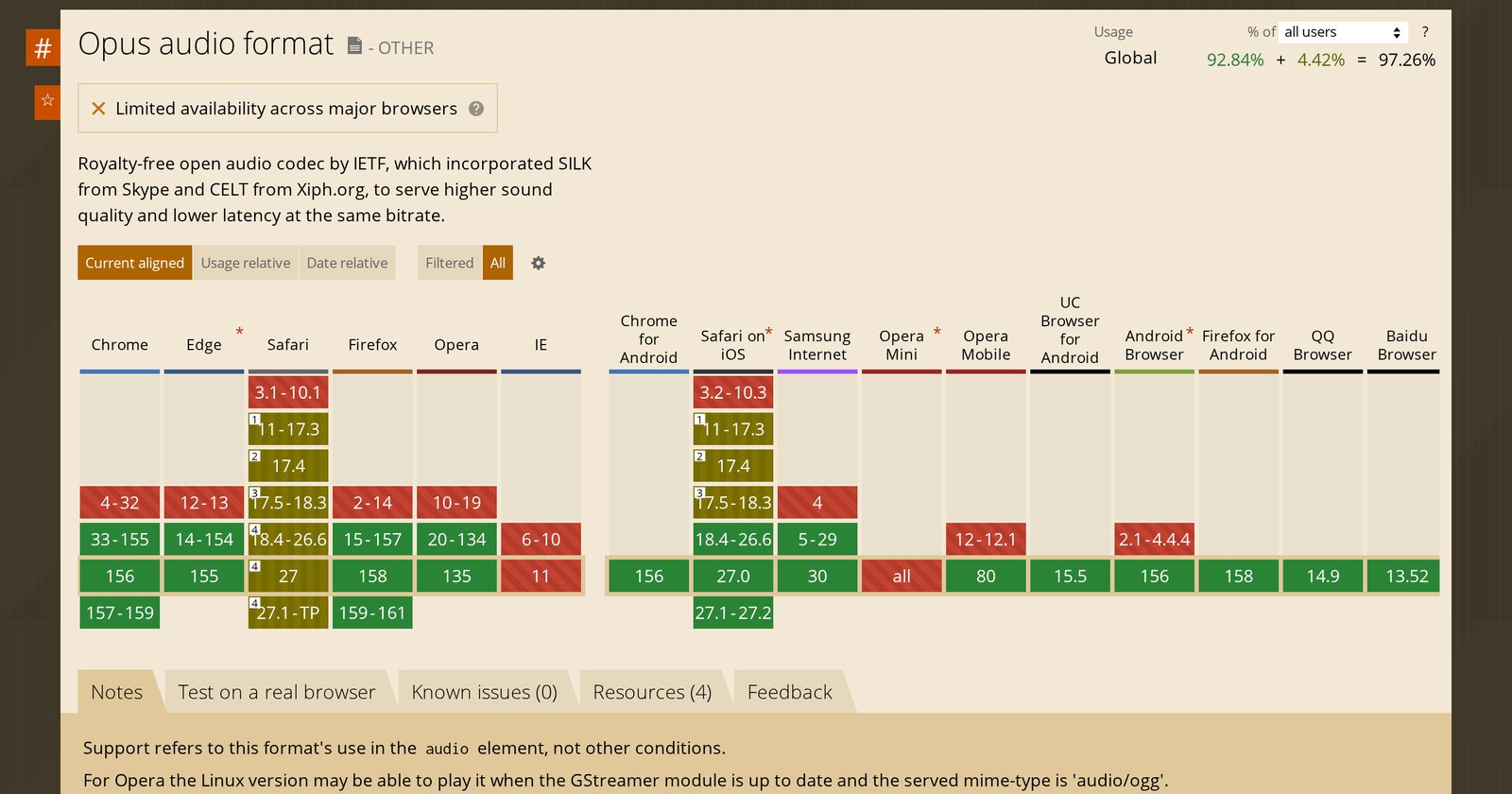
On Can I use, Opus in the audio element is full support in Chrome from 33 and Firefox from 15. Desktop Safari stays partial from version 11 through the current 27-series builds. On iPhone Safari, the table marks support from 18.4.
Operational translation: Opus on the main mount covers Chrome, Firefox and the Android stack that follows them. Anyone listening in old Mac Safari, or in a player that only asks for AAC, needs the second URL. AAC, not 320 kbps MP3.
Fraunhofer IIS, which lives on AAC, calls HE-AAC the predominant streaming codec and points to Apple HLS. That is an interested vendor talking. The fact that remains: the Apple chain (Safari, iOS, HLS) was built around the AAC family. That is why the second mount is AAC, not an MP3 "just in case."
Two mounts and a bitrate a listener can afford
Do not open three MP3 rates (64, 128, 320) to look like a big group. Open two codecs in the range where a primary source already said music fits.
Opus at 64 kbps for a modern player. AAC at 96 kbps for Apple and for the aggregator that still asks for AAC. MP3 only if a set in your audience refuses both. Read that off the Icecast log, not off the station group chat.
The 320 kbps itch is studio vanity: it sounds like a compact disc. A compact disc on a phone is 144 MB an hour against 28.8 MB for Opus at 64. The listener does not hear the disc. They hear the buffer, the data warning and the pause button.
If the station is talk, Xiph is even leaner: audiobooks and podcasts at 24 kbps mono, 32 kbps stereo. Do not copy the music range onto an interview show. Copy the range that matches the content.
Turn the encoder on, listen on phone earbuds over cellular, and only then raise the bitrate. Xiph asks for exactly that: if it sounds fine, nudge it down; if it sounds bad and you have spare traffic, nudge it up. The magic number is not 320. It is the lowest bitrate at which your station still sounds like your station.